Answer member emails and texts from one shared inbox. Fluid connects those conversations with your club's memberships, bookings and staff, then brings templates, follow-ups and feedback into the same platform.
Member conversations, assignment rules and replies in the real Fluid app.Watch the 1:06 demo
One member question. The right next step.
A renewal question, a clinic announcement and a return invitation need different handling. Give your team a place to answer individuals and a way to reach the right group.
Two-way conversations
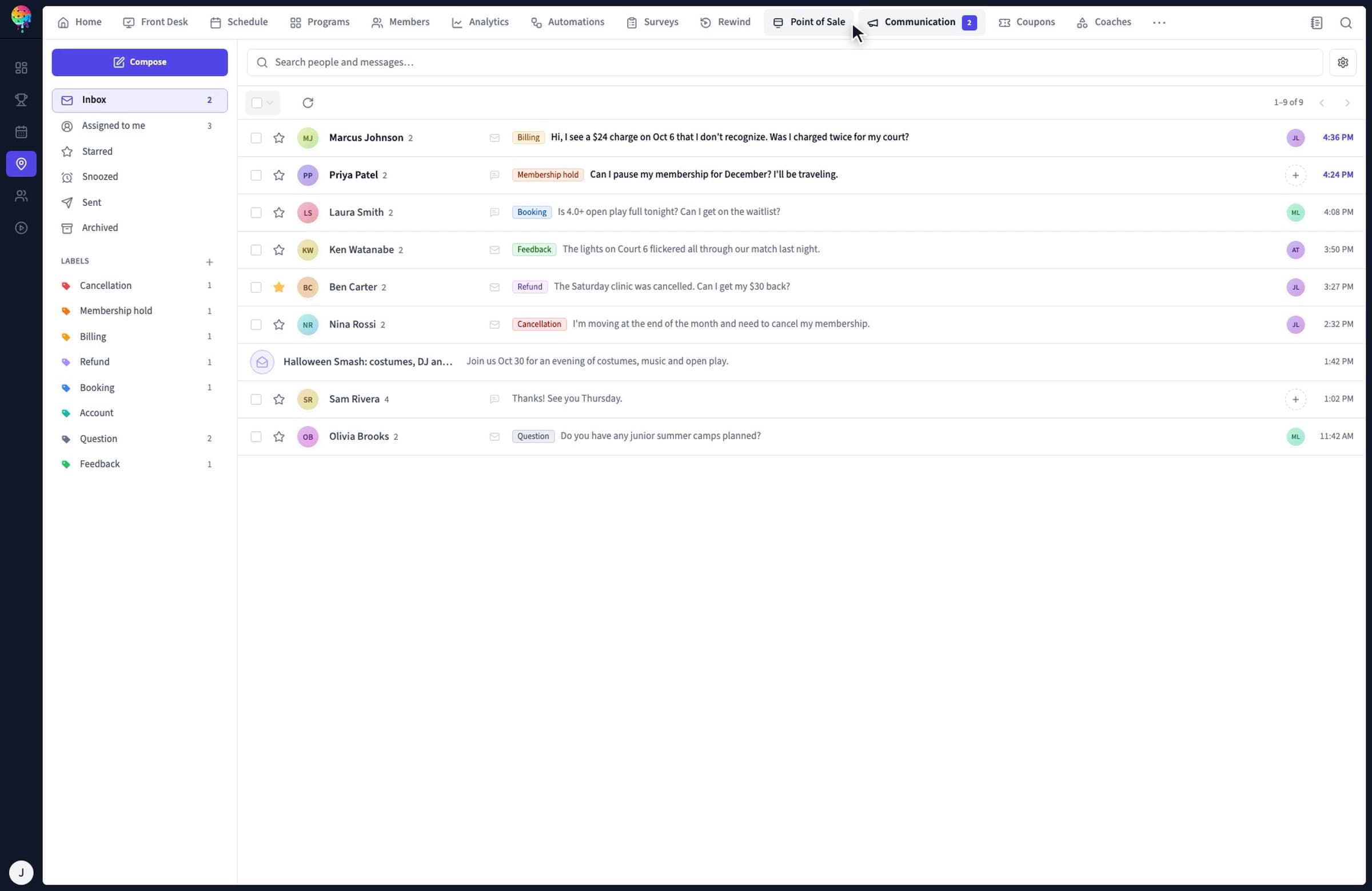
Staff work from shared email and SMS threads, with member details beside the conversation.
Assign, label and snooze threads so the team knows who is handling them.
Review a member's plan, passes and visits while answering.
Use Smart Assist's suggested replies as a starting point for staff to review.
The shared team inbox is included in every club plan. Confirm sending volume, channel setup and any usage charges with the team.
From a member's message to a useful follow-up.
Bring a real example from your front desk to a demo. Follow the member record, the staff handoff and the next message instead of evaluating a broadcast in isolation.
Read the message with its context
A member asks about a renewal or a booking. Open the conversation alongside their membership, passes and visits. Staff can review the member's situation before answering.
Label a thread and assign it to the right person. Assignment rules can route billing questions to a manager and booking questions to the front desk. Staff review suggested replies before sending.
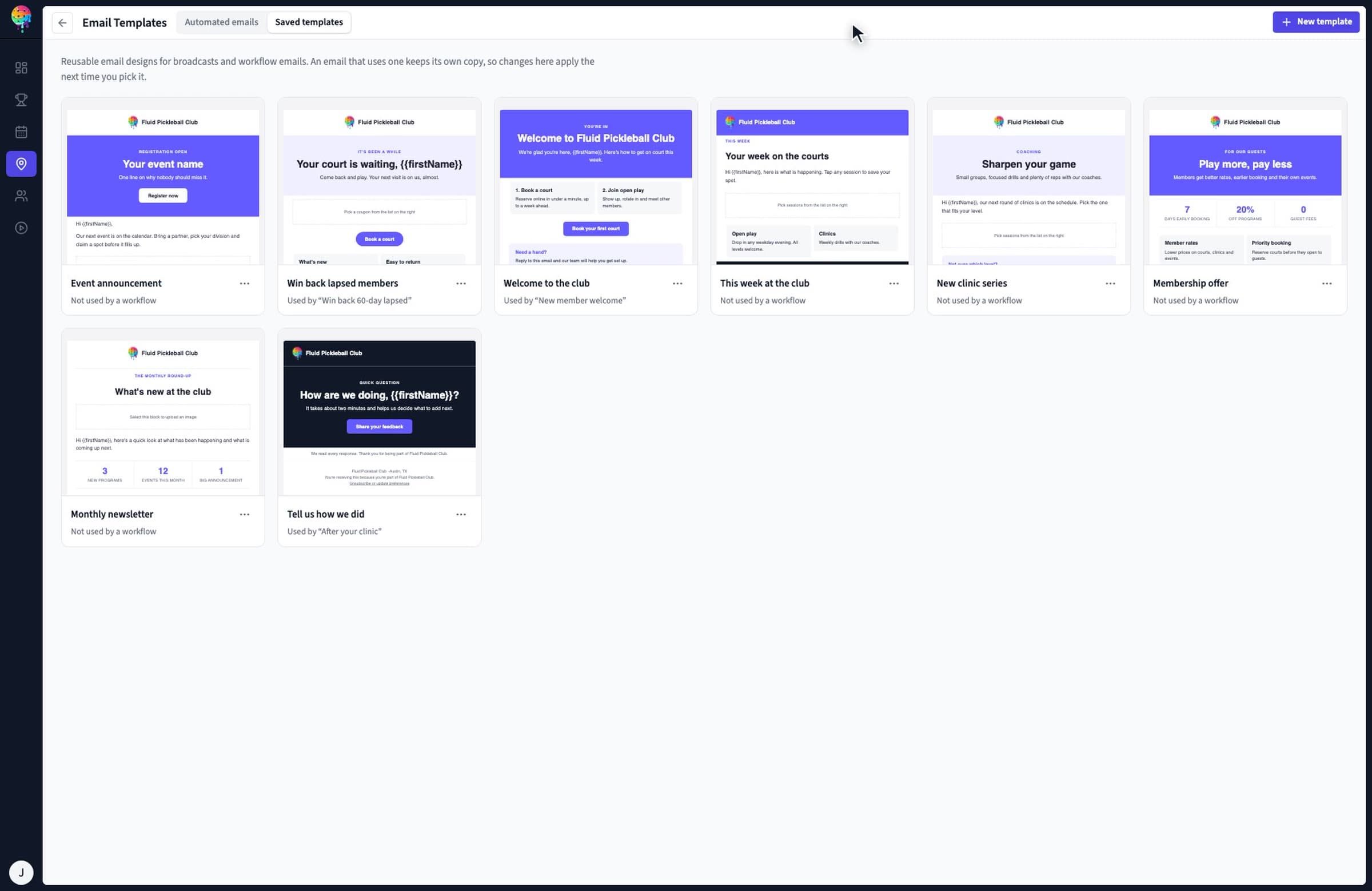
Create a club email with blocks for a program, coupon or survey. Program blocks draw the date, price and registration button from your schedule. Save the design for broadcasts and automated emails.
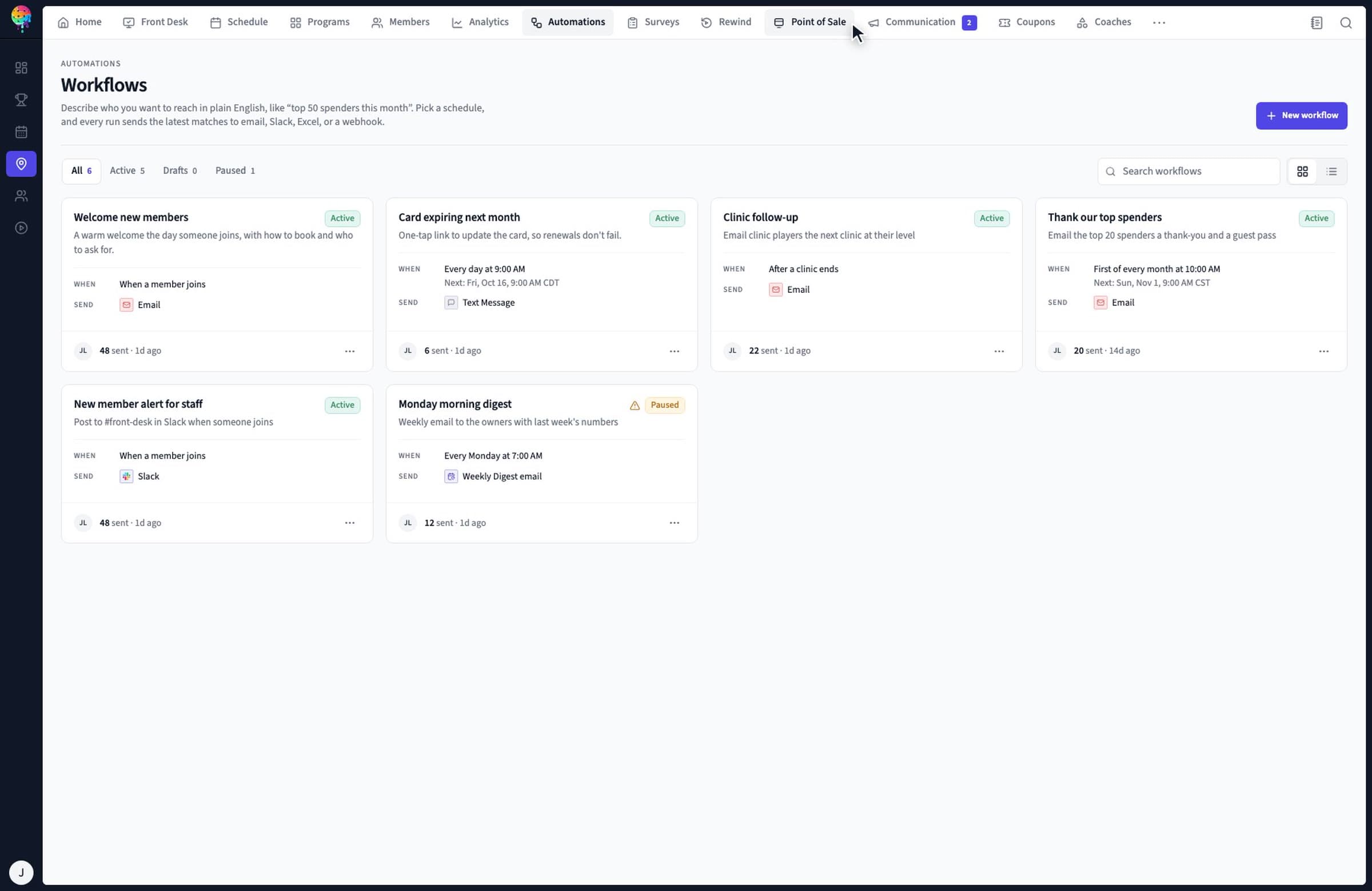
Choose an automation template, inspect its audience, schedule and message, then enable it. The demo walks through a weekly invitation for players whose last visit was more than 60 days ago.
The reply is one part of the work. Staff still need to cover the desk, understand member benefits and learn what should change after a session.
Staff handoffs and access
Team Schedule lays out shifts, hours and time off. When a shift moves, staff can choose to notify the person by text and email. Role defaults and individual permissions determine which sections a team member can use, with location or event scope.
Test a manager, coach and front-desk role using your own responsibilities.
Move a shift and review the notification before sending it.
Use shared staff notes for a task or a member flag at check-in.
Build a survey with ratings, scores and multiple-choice questions. Share its link or send it through an automation after a clinic, a member's first month or a cancellation. Review individual responses and the completion rate.
Ask a specific question about the program or member experience.
Review the response before deciding who should follow up.
Use reporting and acquisition analytics to examine visits, programs and booking funnels.
Email builder, surveys, staff scheduling and detailed access requirements
Demonstrated in the club tour; confirm the required plan with sales.
Ask the team to confirm email and SMS allowances, any usage charges, sender setup and channel availability. Plan campaigns around members' communication preferences. Fluid's communication terms explain marketing opt-outs and the distinction between promotional and service messages.
Questions from club owners.
Can our staff manage email and text messages in the same inbox?
Yes. Fluid's shared team inbox brings member email and SMS conversations together. Staff can label and assign threads, view member context and review suggested replies. The shared team inbox is listed in Starter, Pro and Scale. Confirm sender setup, sending allowances and any usage charges with sales.
Can we send a message to a group of members?
Yes. Fluid supports email and text broadcasts to groups of members. Its email builder saves designs as templates, with blocks for club programs, coupons and surveys. Confirm the audience rules, channel availability and sending volume your club needs before choosing a plan.
Which plans include automated follow-ups?
The workflow builder is included with Pro and Scale. Fluid demonstrates templates for onboarding, retention, loyalty and billing, with an audience, schedule and message to review before enabling a workflow. Starter includes the shared inbox but does not include the workflow builder.
Can we collect member feedback after a clinic?
Yes. Fluid's survey builder supports ratings, scores and multiple-choice questions. You can share a survey link or send it through an automation, then review responses and completion rates. Confirm survey availability for your plan; the workflow builder for automated follow-ups begins with Pro.
Can we control which staff members use each part of Fluid?
Yes. Fluid demonstrates role defaults, section-level permissions, individual adjustments and location or event scope. Team Schedule also shows staff shifts, hours and time off, with an option to notify someone when a shift changes. Confirm the required staff tools and access controls in your plan.
Are unlimited texts and emails included?
The published pricing table includes the shared inbox across club plans, but it does not establish unlimited sending. Ask sales to confirm email and SMS allowances, any usage charges, sender setup and channel availability for your club. Review member communication preferences before sending campaigns.
Bring your busiest inbox.
Show the team a booking question, a membership issue and the follow-up you want to send. Map the people, channels and plan needed to handle them. Switching systems? Use the club migration guide to plan the records and communication setup your team needs.