Pickleball Membership Management Software.

A membership is more than a recurring payment. Connect your club's dues, court access, play passes and daily check-in in Fluid, with the member's plan available when staff need it.

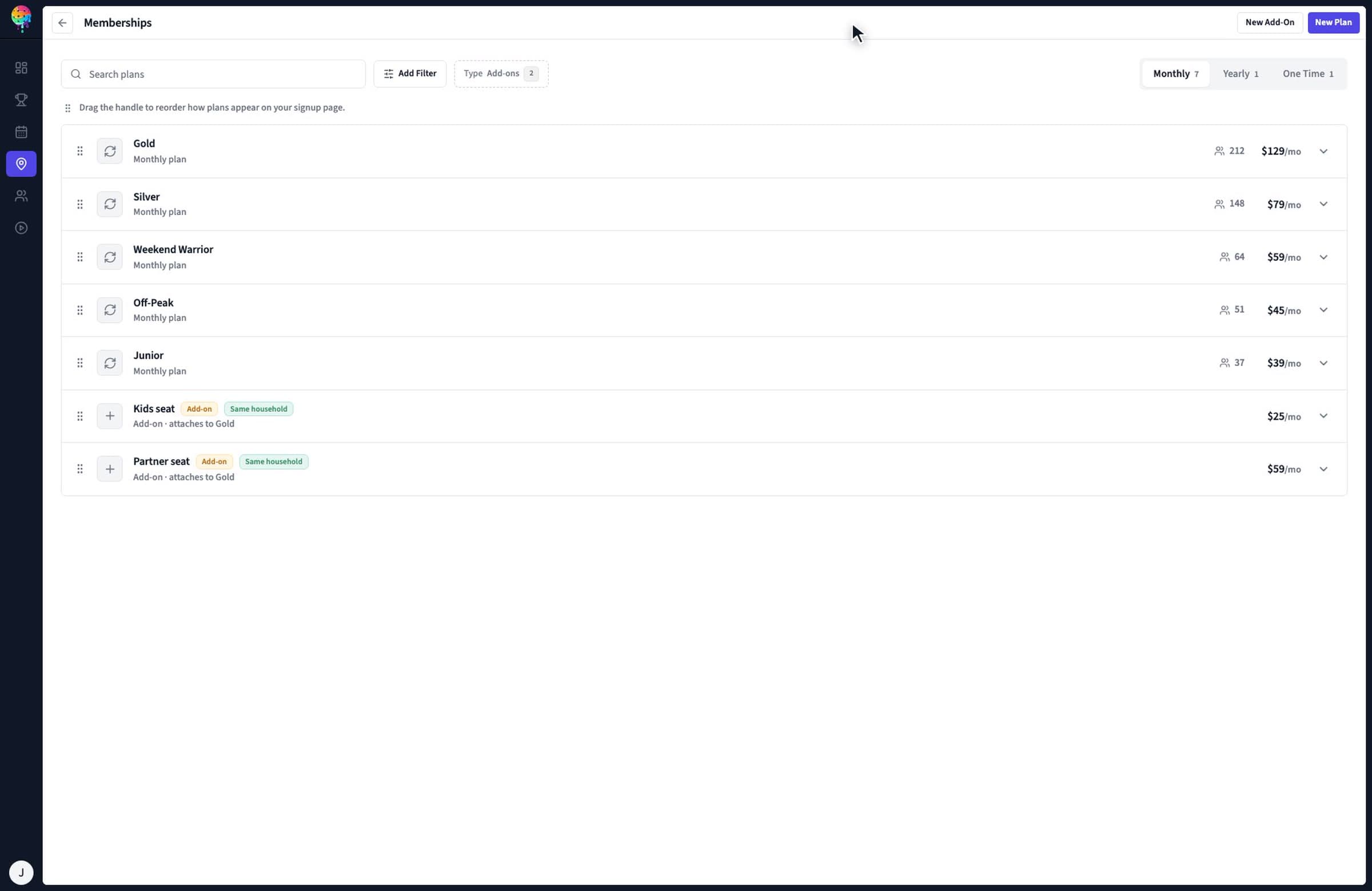
Fluid membership settings with plan pricing, included benefits and booking rules
Your plan's price, benefits and booking rules in one place.Watch the 1:13 membership demo

Define the membership.
Include the play.

Build plans around how your members use the club. Decide what they pay, who the membership covers and which benefits apply when they book.

Billing and household choices

Offer monthly or annual plans, family and junior memberships, day passes and add-ons.

  • Set trials, first-month discounts and initiation fees where they fit your club's offer.
  • Give family members their own seats, with shared perks pooled on the primary member.
  • Collect recurring dues through Stripe using the card on file.
Compare club software plans

Court access and play passes

Give each membership booking rules and benefits that fit the times and programs it covers.

  • Set advance booking windows, peak and off-peak access, and daily or weekly court-hour allowances.
  • Limit how many bookings or pass-based sessions a member can hold at once.
  • Include open-play, clinic and guest passes, with day or time restrictions where needed.
Explore court booking and open play

Follow a membership through the club.

Use the product tour to evaluate the full member experience, from choosing a plan to the next renewal.

  1. Join the right plan

    Give each plan its own signup link. Define the billing period, included benefits and available add-ons so a household, a weekday player or a frequent visitor can choose the right membership.

    See membership setup
  2. Book with their benefits

    When a member books, Fluid applies their membership pricing. Court-hour allowances, advance booking windows and play passes connect what they bought to the courts and sessions they can use.

    Watch a member book
  3. Arrive and check in

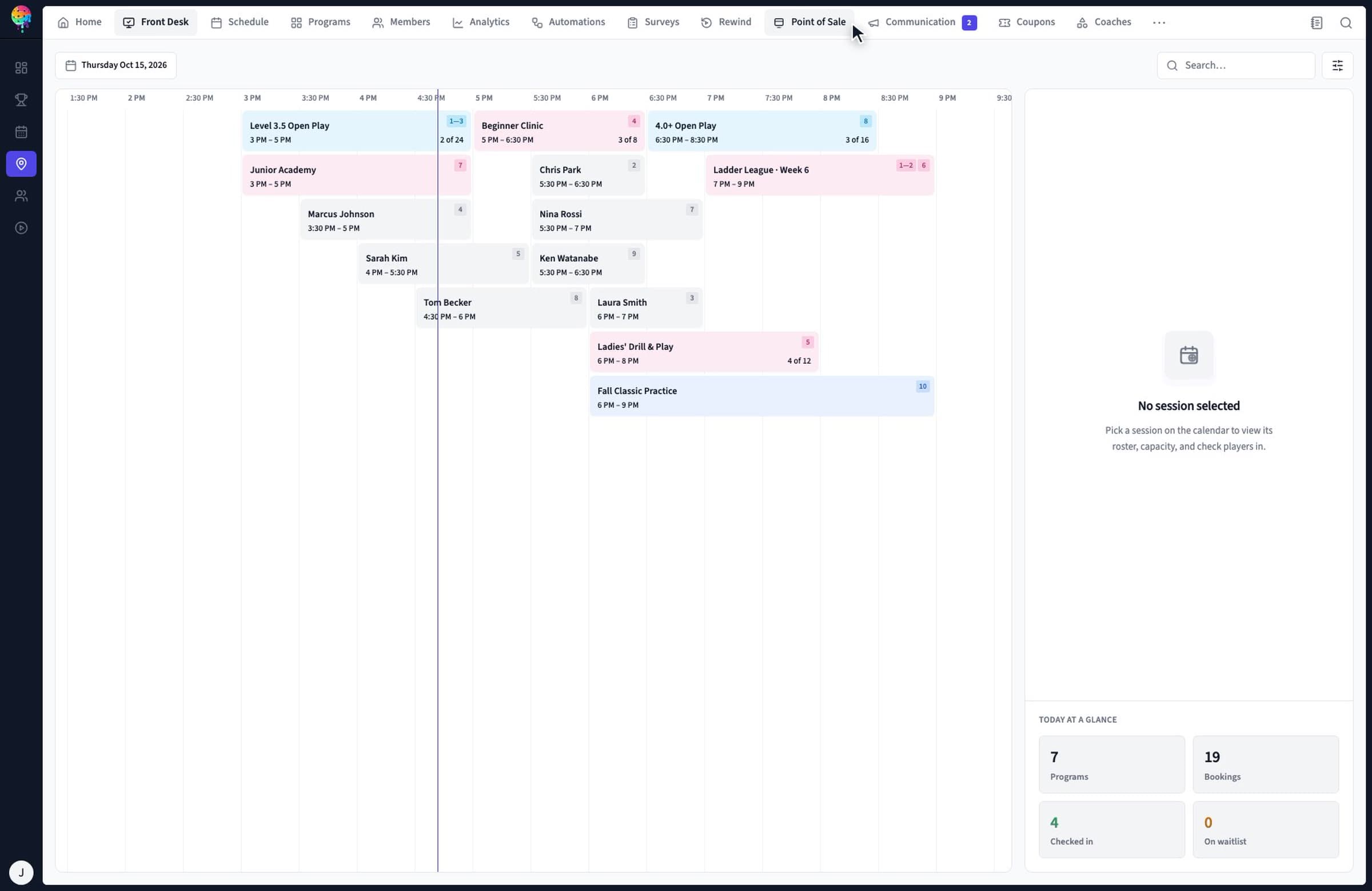
    Staff see the day's bookings and session rosters in Front Desk. Check members in with one tap, or see their check-in appear when they use a kiosk or their phone.

    See the front-desk workflow
  4. Renew and handle exceptions

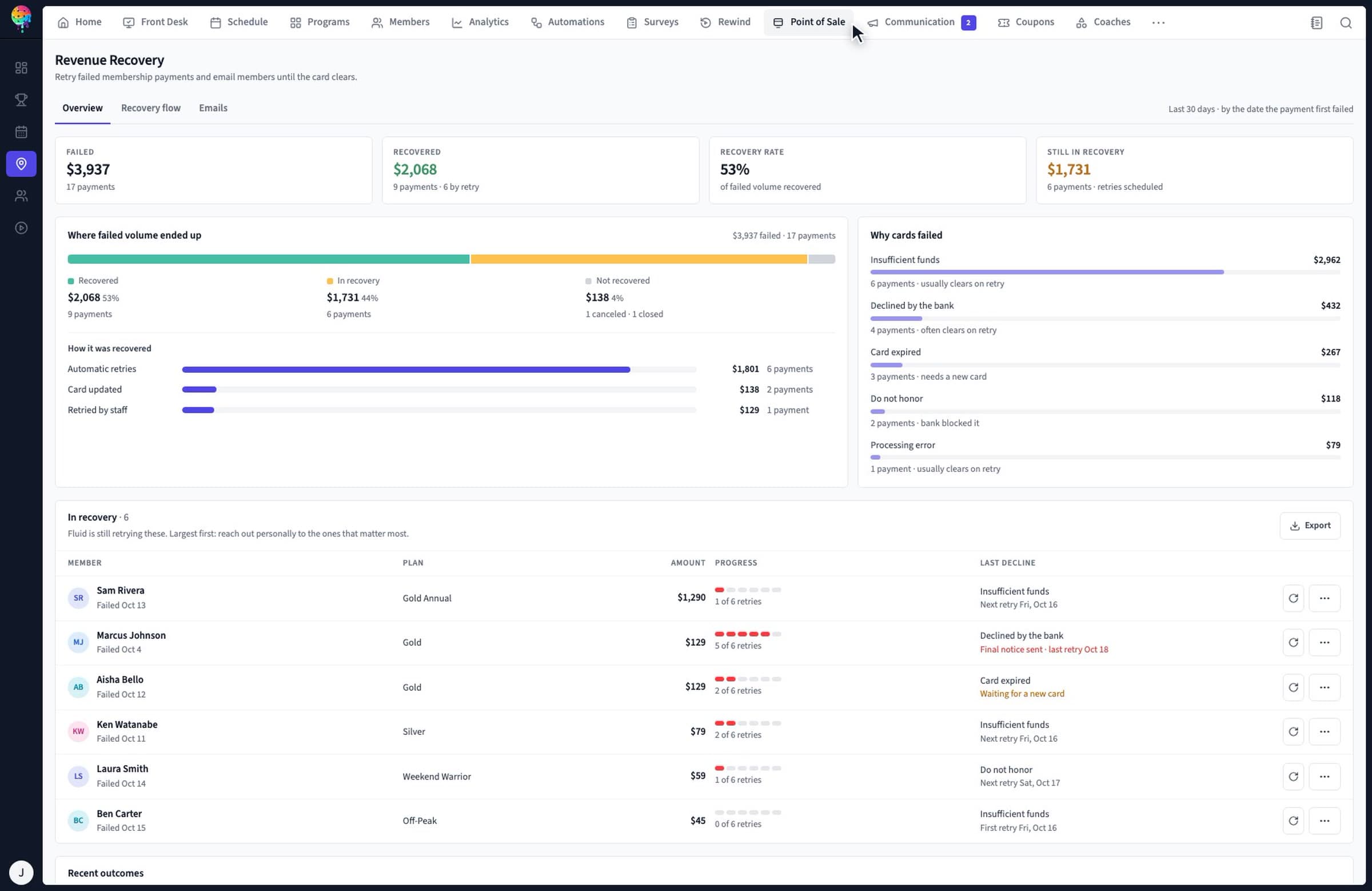
    Dues renew on the card on file. Membership pauses hold billing while a member is away. For a failed renewal, Revenue Recovery gives staff a view of retries, member messages and payment outcomes.

    Watch failed-renewal recovery
Fluid Front Desk with session rosters and member check-in

See who is coming and check players in from the day's roster.

Watch front desk (0:39)
Fluid Revenue Recovery showing failed membership renewals and retry status

See failed renewal attempts, recovery status and what happens next.

Watch revenue recovery (4:14)

Give the team the member's context.

A billing question, a shift handoff and a busy front desk all touch the same membership. Evaluate the staff tools alongside the member experience.

Answer from a shared inbox

Member emails and texts land in one inbox. Staff can see the member's plan, passes and visits beside the conversation. Labels and assignment rules help route billing, booking and membership questions to the right person.

Recovery email replies also land on the member's thread, so a payment question can be answered from the same place.

Explore club communication

Watch inbox and messaging

Prepare the next shift

Team Schedule shows weekly shifts and each person's hours. Staff can mark unavailable days, and a manager moving a shift can choose to notify the person by text and email.

Staff notes hold shared updates and assigned to-dos. A note flagged to a member appears when they check in, until it is resolved.

Watch staff scheduling

Watch shift handoff notes

Start with membership essentials.

Membership management is included in every club plan. Add the operating tools your facility needs. See full pricing and plan comparison.

Published plan availability for membership and club operations
Your club needsPublished plan availability
Membership management, court reservations, member check-in, Stripe payments, shared team inbox and web member experienceStarter, Pro and Scale
Open play, waitlists, simple in-club tournaments and scramble playStarter, Pro and Scale
Recurring leagues, workflow automation, pro shop POS and advanced reportingPro and Scale
Branded native iOS and Android appPro add-on; included with Scale
Multiple locationsScale

The public plan table does not separately list Revenue Recovery or staff scheduling. Confirm their plan availability and setup with the team. Multi-division tournaments use the separate Fluid tournament software.

Questions from club owners.

What types of memberships can a pickleball club offer with Fluid?

Fluid supports monthly, annual, family and junior memberships, as well as day passes and add-ons. Plans can include court hours, open-play passes, guest passes and member discounts. Family and household plans give each person their own seat, with shared perks pooled on the primary member.

Can each membership have its own court-booking rules?

Yes. Set how far ahead members can book, peak and off-peak access, daily and weekly court-hour limits, and how many bookings they can hold at once. Plans can be limited to certain days, and Fluid applies membership pricing when a member books.

Can members pause a membership?

Yes. A membership pause holds billing while the member is away, and the plan resumes when they return. Include your club's pause policy in the membership setup discussion so the team can walk through your process.

What happens if a recurring membership payment fails?

Fluid's Revenue Recovery supports a configurable retry schedule, club-branded payment emails and a link for members to update their card without logging in. Staff can see attempts and outcomes, retry a payment manually, and choose whether an unpaid membership is canceled or left past due after the final retry. Confirm Revenue Recovery's activation and plan coverage with the team.

Do members need to download an app?

No. The web-based member experience works on phones, tablets and computers and is included with Starter, Pro and Scale. A branded native iOS and Android app is available as a Pro add-on and is included with Scale.

Which Fluid plan includes membership management?

Starter, Pro and Scale all include membership management, court reservations, member check-in, Stripe payments and the web-based member experience. All club plans also include open play, waitlists, simple in-club tournaments and scramble play. Pro and Scale add recurring leagues and workflow automation. Multi-division tournaments use the separate Fluid tournament software.
Bring your current plans.

Walk through your dues, household rules, booking allowances and renewal process with the team. Moving from another system? Use the club migration checklist to prepare your member records and billing questions.